Goodnotes vs Notability: App Store Keyword and Screenshot Analysis
Compare how Goodnotes and Notability position AI notes, handwriting, PDFs, audio, study workflows, screenshots, pricing, and conversion in the App Store.
In this article
- 01Two note apps are becoming broader AI workspaces
- 02App Store snapshot
- 03The metadata makes different breadth choices
- 04Goodnotes screenshots connect AI to existing notes
- 05Notability leads with a sharper learning narrative
- 06Public keyword clusters overlap, but the hierarchy differs
- 07Pricing architecture changes the conversion question
- 08Trust depends on durable access to notes
- 09Which listing is clearer?
- 10Growth opportunities
- 11Lessons for note-taking apps
- 12FAQ
Two note apps are becoming broader AI workspaces
Goodnotes and Notability still compete around handwriting, Apple Pencil, annotation, audio, organization, and PDFs. Their current App Store listings also show a larger strategic shift: both want to turn captured notes into summaries, answers, study material, and finished work through AI.
The difference is emphasis. Goodnotes presents a broad note, document, canvas, meeting, and work platform. Notability makes the first creative sequence more directly about faster learning and automatic note generation. This comparison uses the public US App Store listings captured on June 28, 2026.
App Store snapshot
The metadata makes different breadth choices
Goodnotes places AI Notes, Docs, PDF directly in the title, then adds note taking, canvas & work appin the subtitle. It is explicitly expanding beyond a digital notebook into documents, whiteboards, meetings, collaboration, and professional workflows.
Notability uses AI Notes & PDF app in the title, while the subtitle stays concrete: Write, type, annotate, draw. This preserves familiar note-taking actions even as the screenshot sequence promotes AI study outcomes.
| Signal | Goodnotes | Notability |
|---|---|---|
| Core category | Notes, documents, PDF, canvas, work | Notes, PDF, writing, typing, annotation, drawing |
| AI role | Answers, meeting summaries, document workflows | Smart notes, automatic notes, quizzes |
| Audience breadth | Professionals, students, planners, teams | Students, teachers, meetings, note takers |
| Positioning risk | Breadth may dilute the notebook identity | Study-first creative may narrow work perception |
Goodnotes screenshots connect AI to existing notes
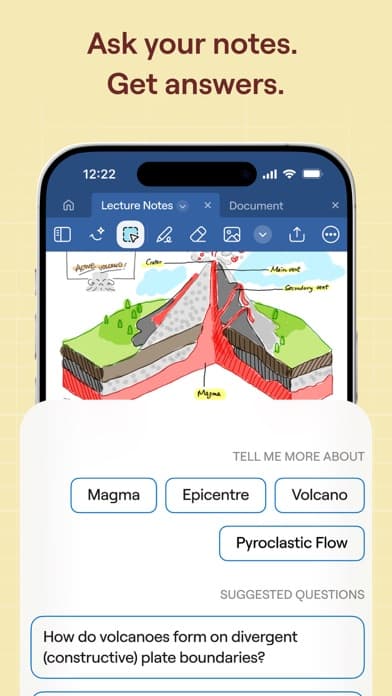
Ask your notes. Get answers. makes AI retrieval the opening benefit. The visible handwritten volcano notes preserve the product's traditional identity while the suggested questions demonstrate a new interaction model.
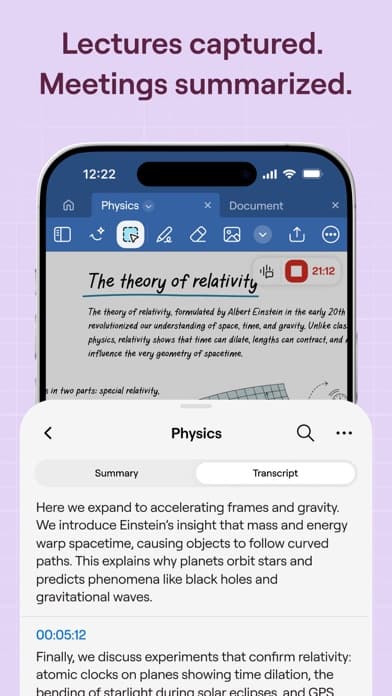
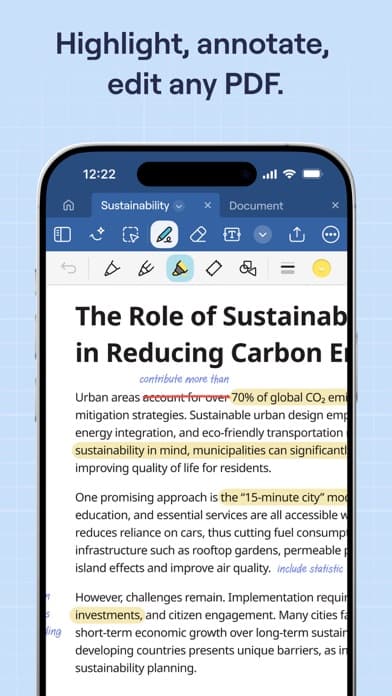
Lectures captured. Meetings summarized. broadens the audience from students into professionals. The third frame returns to a stable core job: Highlight, annotate, edit any PDF. This sequence uses AI as an extension of established capture and annotation workflows rather than as a separate chatbot.
Notability leads with a sharper learning narrative
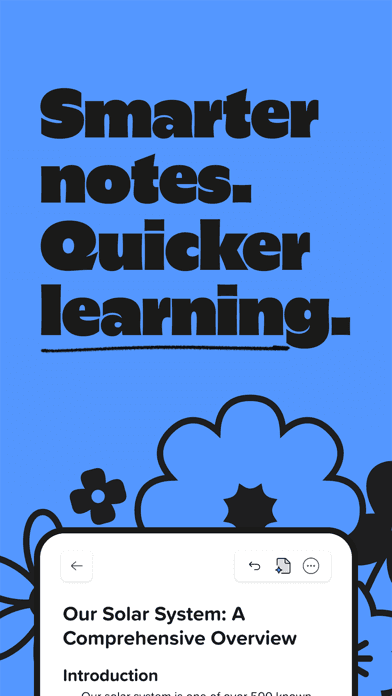
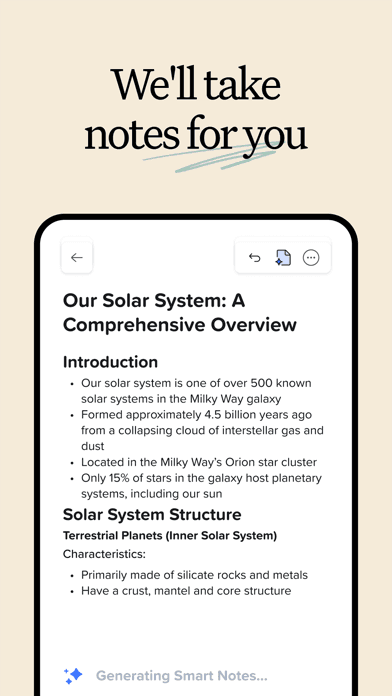
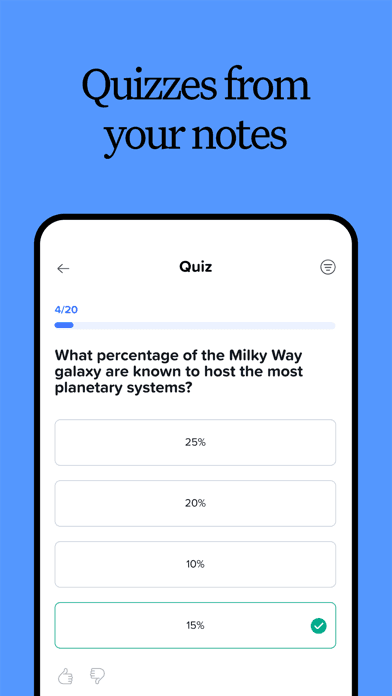
Notability opens with Smarter notes. Quicker learning.The second frame promises We'll take notes for you, and the third turns those notes into quizzes. The three frames form a clear learning loop: capture, structure, practice.
This is stronger narrative sequencing than a general feature list. It also creates a risk: professional users may not immediately see meetings, PDF annotation, or broader work value in the opening frames. A work-focused Custom Product Page could solve that without weakening the student sequence.
Public keyword clusters overlap, but the hierarchy differs
Shared clusters
note taking, handwritten notes, Apple Pencil, PDF annotation, audio notes, transcription, AI notes, study, documents, organize
Differentiating emphasis
Goodnotes: canvas, documents, meetings, collaboration, planning. Notability: quicker learning, automatic notes, quizzes, writing, typing, annotation, drawing.
Neither hidden keyword field is public. Teams should compare visible metadata and creative, then validate candidate terms rather than presenting inferred hidden keywords as fact.
Pricing architecture changes the conversion question
Both apps are free to download with in-app purchases, so the store page must sell enough immediate value to earn installation while preparing users for plan boundaries. Goodnotes publicly presents annual tiers, AI-related purchases, and a one-time option. Notability also uses subscriptions and paid capability tiers.
The key conversion issue is not which price is lower. It is whether the screenshot promise maps clearly to the free experience and whether AI, audio, sync, collaboration, and export limits are understandable before the user invests a notebook library.
Trust depends on durable access to notes
Note apps hold high-value personal and academic data. Sync, export, backup, handwriting fidelity, audio alignment, subscription changes, and cross-device access therefore affect conversion quality, not only retention.
Review analysis should separate creative preferences from serious continuity problems. A repeated complaint about templates calls for a different response than lost notes, failed sync, inaccessible purchases, or export failures. Use the review-led conversion framework before changing positioning from featured anecdotes.
Which listing is clearer?
Goodnotes is clearer about breadth. Its title, subtitle, description, and screenshots show a platform spanning notes, AI, documents, PDFs, canvas, meetings, study, and work. Notability is clearer about an immediate learning sequence. Its opening screenshots move from smarter notes to automatic capture to quizzes with little interpretation required.
Neither approach is universally stronger. Goodnotes is better positioned for audience expansion; Notability currently has the tighter opening story. Conversion results should be evaluated by audience and acquisition source.
For the opposite end of the study-app business-model spectrum, see our AnkiMobile ASO analysis.
Growth opportunities
Goodnotes
- Create dedicated student and work product pages
- Clarify which AI workflows belong to each plan
- Preserve handwriting identity while expanding into documents
- Use export and sync confidence as proof where supportable
Notability
- Keep the strong learning sequence for student traffic
- Build a meeting and professional-work sequence
- Show PDF and handwriting depth after the AI promise
- Set clearer expectations for automatic notes and quizzes
Lessons for note-taking apps
- AI should extend the captured content, not obscure the core note workflow
- A three-frame learning or work sequence is stronger than unrelated features
- Audience expansion benefits from Custom Product Pages
- Plan boundaries are part of conversion messaging
- Sync, export, and ownership trust must support creative promises
Use the screenshot copywriting guide to design a promise, workflow, and proof sequence for a note app.
FAQ
How do Goodnotes and Notability position differently?
Goodnotes presents a broad notes, documents, PDF, canvas, meeting, study, and work platform. Notability's opening creative currently emphasizes faster learning, automatic notes, and quizzes.
Which app has the stronger screenshot sequence?
Notability has the tighter first-three narrative for student traffic. Goodnotes demonstrates broader product coverage and may convert a wider mix of work and study audiences.
Do both apps target AI note keywords?
Both use AI notes language publicly, but their hidden keyword fields are not visible. Goodnotes emphasizes broader work and document workflows; Notability emphasizes capture and learning outcomes.
How often should this comparison be updated?
Recheck when titles, subtitles, opening screenshots, AI plan limits, pricing, sync, or major note-capture workflows change.
Continue your ASO workflow