Darkroom ASO Analysis: Keywords, AI Screenshots, and Growth
A current Darkroom ASO analysis covering photo and video editor keywords, AI screenshot strategy, pricing, reviews, and growth opportunities.
In this article
- 01Darkroom now sells breadth and specialization at once
- 02US App Store snapshot
- 03The title and subtitle cover three different search intents
- 04The first three screenshots tell a modern premium story
- 05Description breadth creates a hierarchy problem
- 06Pricing must bridge hobbyist and professional expectations
- 07Reviews connect native speed with reliability risk
- 08Competitive position
- 09Growth opportunities
- 10Lessons for premium creative apps
- 11FAQ

Darkroom now sells breadth and specialization at once
Darkroom began with a clear mobile-photography identity, but its current listing reaches beyond a minimalist photo editor. It now presents photo and video editing, AI-powered masks, presets, RAW and ProRAW workflows, batch tools, organization, and creator sharing.
The growth opportunity is not adding more capabilities to the listing. It is building a hierarchy that tells users why Darkroom is the right alternative to Lightroom, Photoshop, preset-first editors, and simpler social creation tools.
US App Store snapshot
Snapshot checked June 28, 2026. Darkroom's title is Darkroom: Photo & Video Editor, and its subtitle is Pro Editing, AI&Preset Filters. The free listing shows a 4.8 rating from about 29K ratings, Editors' Choice recognition, and in-app purchases.
| Layer | Visible signal | Job |
|---|---|---|
| Title | Photo & Video Editor | Capture broad category demand |
| Subtitle | Pro Editing, AI & Preset Filters | Signal depth, automation, and style |
| Screenshot 1 | AI-backed Masks | Precise selective editing |
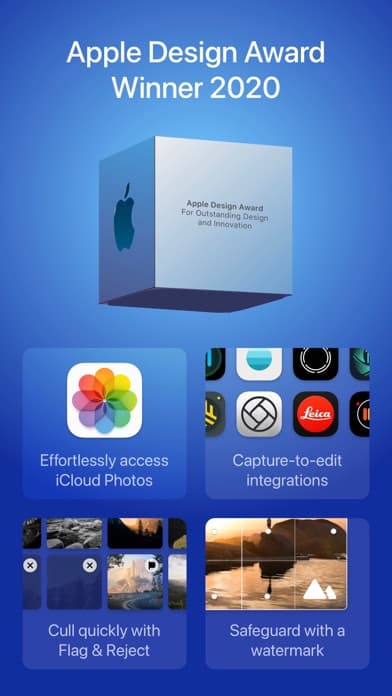
| Screenshot 2 | Apple Design Award Winner 2020 | Trust and native-product credibility |
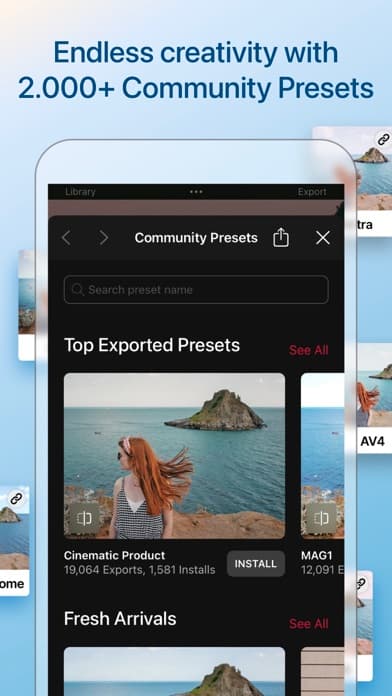
| Screenshot 3 | 2,000+ Community Presets | Fast style discovery and social proof |
The title and subtitle cover three different search intents
“Photo & Video Editor” captures the broad job. “Pro Editing” addresses users seeking deeper control. “AI & Preset Filters” covers two faster paths to a result: automated selection and reusable style. This is efficient semantic coverage, although the compressed “AI&Preset” presentation sacrifices readability.
Core category
photo editor, video editor, edit photos, photo filters, video color grading
Professional workflow
RAW editor, ProRAW, curves, HSL, color grading, batch editing, metadata
Fast creative outcomes
AI photo editor, masks, portrait editing, presets, collage, social sharing
The hidden keyword field is not public. Teams should treat these as intent clusters and run a competitor keyword-gap analysis before deciding which terms belong in metadata.
The first three screenshots tell a modern premium story
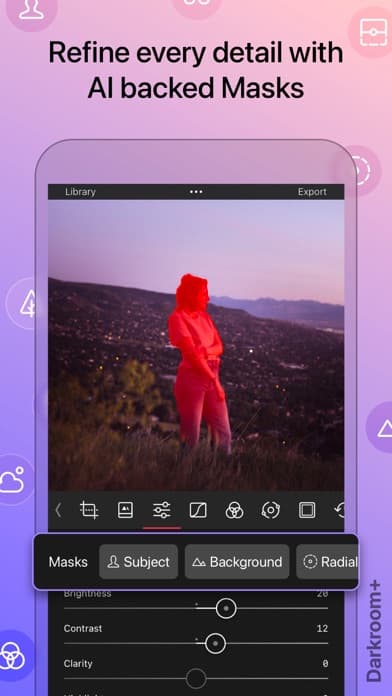
Refine every detail with AI backed Masks leads with a current, high-value capability and proves it with subject, background, and radial selections. It uses AI as a precision tool, not as a generic promise to improve every photo automatically.
Apple Design Award Winner 2020 converts recognition into product evidence by pairing it with iCloud Photos access, capture-to-edit integrations, culling, and watermarking. The third frame, Endless creativity with 2,000+ Community Presets, makes breadth measurable and introduces a community loop.
The sequence is strong, but the first screen prioritizes an advanced feature before establishing the fastest everyday outcome. A Custom Product Page for hobbyist traffic could open with one-tap style or direct Photos-library editing while preserving this pro sequence for RAW and competitor traffic.
Description breadth creates a hierarchy problem
The current description covers AI object detection, depth-based edits, RAW and ProRAW, 8K color grading, batch workflows, presets, collages, hashtags, organization, sharing, and community education. Each feature is relevant, but the combination can make Darkroom look like several products competing for the opening paragraph.
A clearer order would be: edit directly from the photo library, achieve professional color and selective adjustments, apply or build reusable looks, process multiple assets, then organize and share. This moves from the native workflow advantage to editing depth and finally to expansion features.
Pricing must bridge hobbyist and professional expectations
Darkroom is free to download. The visible US in-app purchase list includes a $9.99 monthly plan, a $39.99 yearly plan, and a $99.99 lifetime unlock, alongside legacy purchases. Offering subscription and lifetime options can address different ownership preferences, but only if the listing makes free and paid boundaries understandable.
Users need to know whether masks, advanced color tools, premium presets, batch processing, video features, export settings, and community functionality require Darkroom+. Screenshot promises should not outrun the experience available after install.
Reviews connect native speed with reliability risk
Visible positive language emphasizes a native iOS feel, quick access to Photos, RAW workflows, grain, mobility, and an alternative to Adobe's model. These are sharper positioning inputs than generic praise such as “powerful” or “easy.”
Recent version notes also document fixes for RAW previews, masks, batch exports, rendering, and crashes. That does not prove a universal reliability problem, but it identifies workflows that deserve review segmentation by version and device. Follow the review-led conversion framework before making reliability claims.
Competitive position
Defensible strengths
- Direct, native access to the Apple photo workflow
- Professional RAW, masking, color, and batch capabilities
- Distinctive design reputation and Editors' Choice proof
- Preset community plus subscription and lifetime options
Positioning risks
- Broad feature coverage can blur the primary job
- Advanced opening creative may narrow beginner appeal
- AI and preset language overlaps with crowded editors
- Premium boundaries and export reliability affect trust
Growth opportunities
- Segment acquisition intent. Build separate screenshot sequences for hobbyists, RAW photographers, video creators, and preset shoppers.
- Own the native workflow. Make direct Photos access and capture-to-edit speed more prominent.
- Explain the AI. Show what masks detect and where users retain control.
- Clarify Darkroom+. Connect each premium screenshot promise to transparent access expectations.
- Turn reliability into release proof. Monitor RAW, mask, and batch-export review themes after relevant fixes.
- Localize intent, not only strings. Adapt platform examples, creator jobs, and preset styles by market.
Lessons for premium creative apps
- Use AI to explain a specific workflow advantage
- Pair awards with current product proof
- Quantify content breadth only when the number improves the decision
- Separate professional depth from beginner convenience by traffic source
- Treat export and rendering confidence as conversion inputs
For other premium positioning models, compare Streaks vs Things 3 and the owned-workflow strategy in Paprika Recipe Manager. Use our screenshot copywriting examples to turn these lessons into a testable sequence.
FAQ
What keywords does Darkroom target publicly?
Its visible metadata emphasizes photo editor, video editor, professional editing, AI, and preset filters. The description expands into RAW, ProRAW, masks, color grading, batch editing, collages, and organization.
What is Darkroom's strongest screenshot?
The AI-backed Masks frame is the strongest product demonstration because it names a precise benefit and shows subject, background, and radial controls.
Is Darkroom free?
It is free to download with in-app purchases. The current US listing shows monthly, annual, lifetime, and legacy purchase options.
What is the biggest ASO opportunity?
Segment the broad feature set into intent-specific product pages so hobbyists, RAW photographers, video creators, and preset users each see a focused first-three-screen story.
Continue your ASO workflow