CapCut App Store Screenshots: Conversion and Review Analysis
Analyze CapCut's App Store screenshots, template and AI positioning, visible review objections, pricing signals, and conversion opportunities.
In this article
- 01CapCut's screenshots sell creative acceleration
- 02US App Store snapshot
- 03The first three frames favor discovery over editing depth
- 04What the sequence communicates—and what it postpones
- 05Visible review themes change the conversion brief
- 06Pricing signals need clearer expectation setting
- 07A testable alternative screenshot sequence
- 08Lessons for video editor teams
- 09FAQ

CapCut's screenshots sell creative acceleration
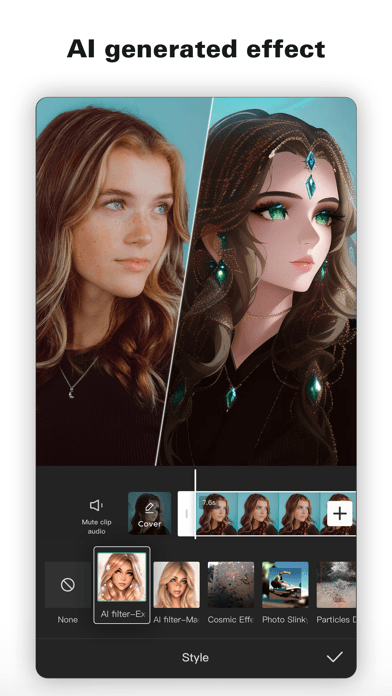
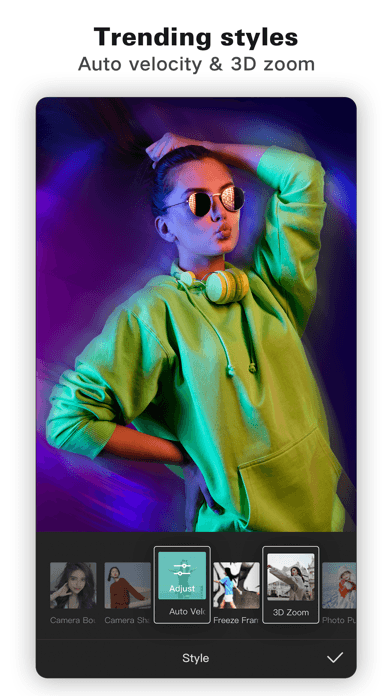
CapCut has enough brand demand to show features without first explaining what a video editor is. Its current opening screenshots focus on three accelerators: ready-made templates, AI-generated effects, and trend-oriented style tools.
That strategy supports discovery and experimentation, but it leaves part of the core editing story implicit. Users concerned about timelines, captions, export, storage, price, or control need evidence beyond visually striking effects.
US App Store snapshot
Snapshot checked June 28, 2026. The listing is titled CapCut: Photo & Video Editor with the subtitle Video maker with music. It is free with in-app purchases, shows a 4.6 rating from about 1.1M ratings, and appears at #1 in Photo & Video.
The title covers the broad photo and video category, while the subtitle stays anchored in a familiar creation job. The description expands into keyframes, slow motion, chroma key, stabilization, captions, text-to-speech, tracking, background removal, effects, music, and 4K export.
The first three frames favor discovery over editing depth
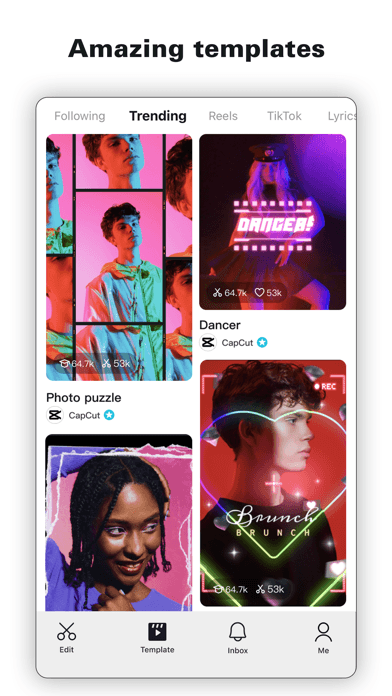
Amazing templates makes speed and trend discovery the first impression. The visible feed, engagement counts, and creator labels add social proof, but the frame also resembles a content network more than a focused editing workspace.
AI generated effect demonstrates transformation with a before-and-after subject, while Trending stylesnames auto velocity and 3D zoom. Together the frames promise results without requiring users to understand advanced editing mechanics.
What the sequence communicates—and what it postpones
| Message | Current proof | Missing or delayed proof |
|---|---|---|
| Create quickly | Template feed | From media selection to finished export |
| Use AI | Generated character effect | Captions, background removal, practical automation |
| Follow trends | Auto velocity and 3D zoom | Control, customization, and originality |
| Edit seriously | Interface controls in crops | Timeline, keyframes, chroma key, stabilization |
| Publish confidently | Implied social output | 4K export, formats, watermark and plan boundaries |
Visible review themes change the conversion brief
Public review language includes appreciation for free editing options, creative breadth, and templates. Visible complaints mention storage pressure, premium pricing, and content in the template feed. These are not proof that every user has the same experience, but they identify objections worth measuring across a larger, current sample.
The screenshots currently reinforce the template feed and premium effects more than storage control, project management, plan clarity, or safe discovery. A conversion test should therefore distinguish creator excitement from trust and ownership questions. Use the review-to-conversion workflow before choosing which objection deserves a creative response.
Pricing signals need clearer expectation setting
CapCut's public US in-app purchase list includes several monthly options and an $89.99 yearly subscription. Storefront purchase lists do not explain eligibility or experiments behind every price, so the article should not reduce the model to one universal monthly rate.
The listing can still clarify the practical boundary: which templates, AI tools, effects, cloud or storage functions, and export options are free, Standard, or Pro. The more the opening screenshots lead with premium-looking results, the more important that access expectation becomes.
A testable alternative screenshot sequence
- Create from a template or start from scratch. Preserve speed while restoring user control.
- Edit every moment on a full timeline. Prove the core workspace before adding more effects.
- Caption, cut, and remove backgrounds with AI. Show practical automation, not only transformation.
- Build motion with keyframes and tracking. Establish advanced depth.
- Export in the format your channel needs. Show resolution and platform outcomes accurately.
- Discover trends with clearer controls. Keep the community benefit while addressing feed expectations.
The wording is a hypothesis, not replacement copy ready to publish. Validate each promise against current product access and follow the screenshot copywriting framework.
Lessons for video editor teams
- Templates communicate speed but can obscure editing control
- Demonstrate practical AI before stacking abstract effects
- Pair social discovery with clear content and privacy expectations
- Show the free-to-paid boundary near premium-looking outcomes
- Use review objections to design tests, not to make universal claims
Compare CapCut's approach with InShot in our CapCut vs InShot ASO comparison, and compare screenshot sequencing in the ChatGPT screenshot analysis.
FAQ
What do CapCut's first screenshots emphasize?
They emphasize templates, AI-generated effects, and trending styles rather than opening with the core timeline or export workflow.
What review objections should CapCut test?
Storage, premium pricing, template-feed content, access boundaries, and project reliability are useful themes to validate across a current review sample.
Should CapCut remove templates from the first screenshot?
Not necessarily. Templates are a strong speed promise, but a test could pair them with start-from-scratch control or move the editing workspace earlier.
How should CapCut communicate AI?
Show concrete jobs such as captions, background removal, tracking, or editing assistance alongside the current style transformations.
Continue your ASO workflow